
Content
Elephant provides a DefaultElement with edition capabilities. The editor uses its own wiki syntax, EWiki syntax
for web pages with heavy formatting, and Wiki syntax
for e-mails or slightly formatted pages.
The elements at play
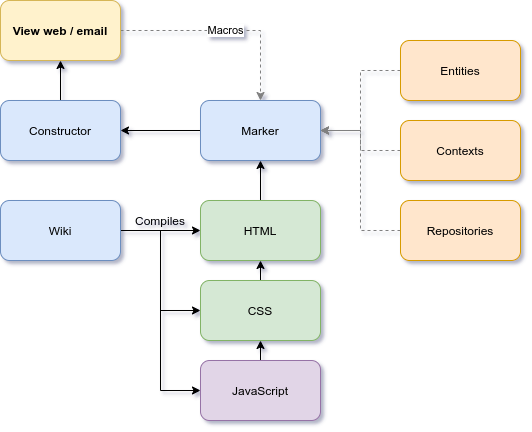
This graphic shows the elements that provide content for a web page or an email. By changing the templates root, the marker will generate different layouts. The wiki syntax ensures that the content fits into these templates.
What will we see in here?
Syntax and layouts
These tutorials require a little understanding of EWiki syntax
. Some layouts will be recommended, for example in landing pages, see Context
.
Tutorials
These are short tutorials, but require some quality time. They all cover some important parts of the EWiki syntax, including Wmacros. You may use traversal reading, when trying to remember something, but have in mind that, if you plan to create rich layouts, you will need to fully read them.Writing content to be emailed
When writing content for emails, complex macros and some multimedia won't render correctly in email clients.
Email content restrictions:
- Use Wiki syntax, or simple EWiki with no Wmacros.
- Use the e prefixed templates when adding buttons.
- When creating columns, use the Wiki for columns:
[column]
...
[column]
...
[/column] - For tables, use the Wiki for tables.
Email applications
Most of the email clients, protect themselves from malicious code and formatting that could endanger their layouts. You may format your content, and add images, but you shouldn't use framework capabilities, since the framework won't run on these apps.
This table shows the content that could be sent as an email:
| Location | Description |
|---|---|
| Publications' summary | Publications have two content parts, the summary and the body. If the publication is intended to be sent by email, use email restrictions in the summary. The body can be reached from the email from the Read more... button. |
| Noticeboard / Marketplace | Use email restrictions in the content. |
| Convocations | Use email restrictions in the content. Notice that the content will be attached to the calendar, in a more restricted environment.
Publication support For convocations referring to events, the best approach is to use a publication as the announcement, with a link to the convocation. If the user is not registered, the convocation will show the option to register.
|
| English | 11/02/20 10:19 | Lluís Turró Cutiller | |
| English | 07/02/26 04:06 | Lluís Turró Cutiller | |
| English | 07/11/26 06:30 | Lluís Turró Cutiller | |
| English | 08/03/26 07:29 | Lluís Turró Cutiller |