A context is a web page. The website is composed by a ROOT context with children. The root structure is a tree, each context can have content and children.
- ROOT
- baas (Show in navigators set to false)
- services
- projects
- organization
- docs
- publication
- search
The full path for current context would be (breadcrumbs and left menu shows current top child's children):
- ROOT
- docs
- elephant
- getstarted
- context
Pages
Elephant sites allow creating as many contexts as you might require, remember a context is equivalent to a page. There is no other limit than the available space and your imagination. Creating pages involve thinking where you want to construct them. To understand this you might think of your site as a tree. The trunk is the home page. First branches will be home its children and so on. Your tree can have many branches, Elephant will take care to make easy the navigation among them.
Navigation
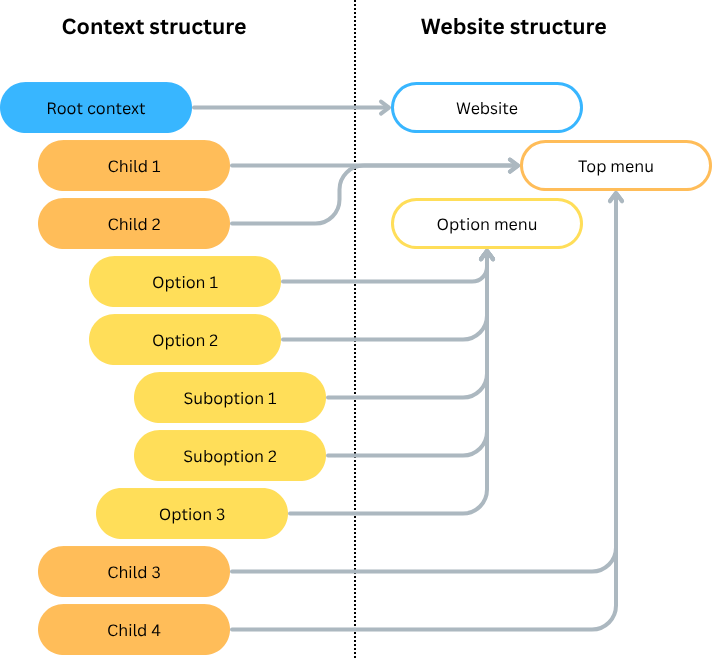
Elephant creates the main menu and option menu based on the context tree.
| Type | Description |
|---|---|
| Main menu | Elephant takes the contexts directly attached to the root, and with Show in navigators set to true. |
| Option menu | Elephant takes selected top context's children and creates a lateral menu. Since this menu can be very populated, the current context is always unfolded, backwards to the root, and forwards to its children.
By default, option menus show 2 levels of indentation, except current context, fully unfolded. |
Construction
Context builds up with two different kinds of elements. The actual elements and the layout elements. Despite their names, they respond to a very usual situation. You know how your site should look and don't want to repeat the design for each page. These elements are the layout elements. They are defined at top level, in site's home, and inherited for lower levels.